

-
Global Industrial
Replacement Lock Set with 2 Keys for Interoffice Mailboxes
Our Price:$8.19This replacement lock set helps office staff restore secure access to compatible interoffice mailboxes. It is a practical choice for replacing a worn or missing mailbox lock while providing two keys...
Drop Boxes Buying Guide
When an interoffice mailbox lock needs to be changed, a replacement lock set can help restore access. Focus on compatibility with the mailbox, how keys will be managed, and the features included with the lock set.
Popular examples in this category
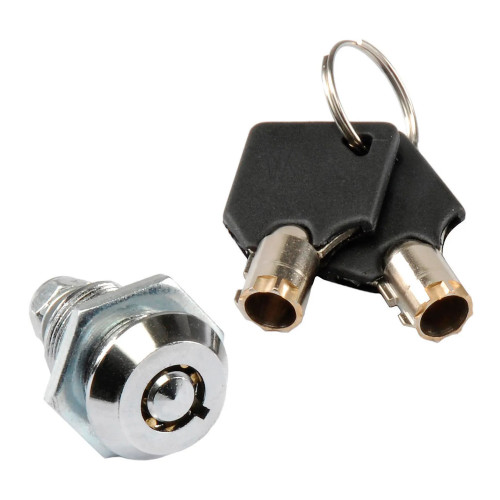 Replacement Lock Set with 2 Keys for Interoffice MailboxesFS-GLO-RP9054
Restore mailbox access
Use a replacement lock set when a compatible interoffice mailbox has a worn or missing lock.
Confirm mailbox compatibility
Choose a replacement lock intended for compatible interoffice mailboxes before planning a lock change.
Support office mailbox upkeep
Replacement lock hardware is a practical option for office staff responsible for interoffice mailbox access.
Plan key access
A set with two keyed-alike keys allows both included keys to operate the same lock.
Provides two keys for access management.
Both included keys operate the same lock.
Offers a neutral hardware appearance.
Supports changing an existing mailbox lock.
Compare the selection considerations
Use these product details to determine whether this replacement lock set suits the mailbox access need at hand.
| Selection consideration | Product detail | Why it matters |
|---|---|---|
| Mailbox use | Replacement lock set for compatible interoffice mailboxes | Helps identify the intended mailbox application. |
| Key access | Two keys included | Supports access management with two keys. |
| Key operation | Keyed alike | Allows both included keys to operate the same lock. |
| Appearance | Black finish | Provides a neutral appearance for mailbox hardware. |
Plan the right fit before choosing
Match the replacement lock to the mailbox
The key consideration is whether the lock set is compatible with the interoffice mailbox being maintained. The supplied product information identifies it as a replacement lock set for compatible interoffice mailboxes; it does not provide additional fit details.
- Use the lock set for compatible interoffice mailboxes.
- Replace an existing lock when it needs to be changed.
- Review mailbox compatibility before selecting replacement hardware.
Choose the key arrangement your office needs
The replacement lock set includes two keys. Because the keys are keyed alike, either included key operates the same lock, providing a straightforward option for managing access.
- Two keys are included with the lock set.
- Included keys are keyed alike.
- Keyed-alike operation lets both included keys operate the same lock.
Keep hardware appearance in mind
The lock set has a black finish, offering a neutral appearance for mailbox hardware. Consider this finish alongside the mailbox and surrounding hardware when replacing a lock.
- Black finish.
- Neutral appearance for mailbox hardware.
- Designed as replacement lock hardware.
Common questions before buying
What is this replacement lock set used for?
It supports replacement of an existing lock on compatible interoffice mailboxes when the lock needs to be changed.
How many keys are included?
The lock set includes two keys.
Can both included keys operate the lock?
Yes. The included keys are keyed alike, so both operate the same lock.
What finish does the lock set have?
The lock set has a black finish.
Choosing the right file folders
FilingSupplies.com carries end-tab folders for open-shelf systems, top-tab folders for drawer filing, and heavy-duty classification folders with dividers and fasteners for multi-section records. Pick letter or legal size, then choose material (11-pt, 14-pt, or 18-pt manila), optional reinforced tabs, color-coding, and expansion capacity to match your volume.
Folder FAQs
End-tab vs. top-tab — what’s the difference?
When should I choose classification folders?
Letter or legal size — how do I pick?
What tab and material options are available?
Can I add fasteners, pockets, or expansion?
Do you offer volume pricing or custom printing?
Outfitting classrooms that work all day
Build a durable, age-appropriate classroom with furniture, early-learning materials, storage bins, learning centers, and presentation tools. Choose adjustable pieces that grow with grades, label friendly bins for quick clean-up, and tech carts that secure, charge, and move easily.
Education FAQs
What safety labels should I look for on school and early-childhood items?
How do I pick classroom furniture across grade levels?
What’s the best way to organize supplies and centers?
How do I choose learning games and manipulatives by age?
What should I consider in a charging/tech cart?
Do you support school POs, bulk pricing, or custom printing?
Choosing the right labels
From color file labels to printable sheets, select the right size, adhesive, and print method to match your filing system and equipment. Decide on sheet vs. roll format, then pick permanent or removable adhesive and your color set.
Labels FAQs
Sheet vs. roll labels — what’s the difference?
Permanent or removable adhesive?
Will these labels work in my printer?
How do I match the label size to folder tabs or binder spines?
Can I get preprinted sequences or color bars?
Do you have templates?
Choosing the right tab dividers
Organize binders with preprinted or blank tabs. Select the number of tabs per set (5, 8, 10, or 12), choose paper with reinforced tabs or durable poly, and match letter or legal size for a clean fit.
Tab Dividers FAQs
What do 5-, 8-, 10-, or 12-tab sets mean?
Paper vs. poly — which should I choose?
Are the tabs printable?
Will they fit my binder?
Can I mix preprinted and blank tabs?
Do you make custom tab sets?
Choosing the right office supplies
From everyday paper and pens to binders, mailers, and desk organizers, pick durable, compatible options that match your equipment and team size. Start with the right paper and labeling, then add organizers that keep work moving.
Office Supplies FAQs
Which paper weight and brightness should I choose?
Round-ring vs. D-ring binders — what’s the difference?
What does “sheet capacity” mean on staplers and hole punches?
Will labels, envelopes, and mailers work with my printer?
How do I choose mailers and shipping boxes?
Do you offer eco-conscious options or bulk pricing?
Choosing the right sports & PE equipment
Equip classes, teams, and rec programs with durable balls, goals, cones, pinnies, storage, and safety gear. Match sizes and materials to age group and whether you play indoors or outdoors.
Sports & Athletics FAQs
What ball sizes should I choose for different ages?
- Basketball: Size 5 (27.5") youth, Size 6 (28.5") intermediate, Size 7 (29.5") official.
- Soccer: Size 3 up to ~8 years, Size 4 ~8–12, Size 5 ~12+.
- Volleyball: Regulation balls for teens/adults; lighter training balls for younger players.
Indoor vs. outdoor — which materials hold up best?
How many pinnies, cones, or markers do I need?
Tips for storage and care?
Are items latex‑free and school‑safe?
Do you support bulk orders or custom printing (team names)?
Choosing the right FireKing fireproof cabinet
FireKing fireproof file cabinets, safes, and storage cabinets are designed to protect important documents, records, and valuables from fire damage while keeping files organized and accessible. When choosing a FireKing cabinet, compare drawer configuration, storage type, fire rating, and overall capacity based on the records or materials you need to protect.
FireKing FAQs
What is the difference between FireKing vertical and lateral file cabinets?
What can I store in a FireKing fireproof file cabinet?
Are FireKing cabinets only for paper records?
How do I choose between a FireKing safe, file cabinet, or storage cabinet?
What sizes are available in FireKing cabinets?
Are FireKing cabinets used in offices, medical facilities, and government records storage?
Can I buy FireKing cabinets in bulk or get help choosing the right model?
Shipping & Policies
Do you offer free shipping?
What are your shipping rates?
- $6.95 for labels-only orders under $40
- $14.95 flat rate for everything else